Showing posts with label Digital Citizen. Show all posts
Showing posts with label Digital Citizen. Show all posts
Tuesday, 27 September 2016

Sunday, 21 August 2016
Minecraft and Literacy - midpoint review
You would be hard pushed to find any parent or teacher who have not heard of Minecraft. An open-world sandbox game, it was first released in November 2011 and has since developed into the second best-selling video game (behind Tetris). According to Wikipedia, as of June this year over 106 million copies have been sold, across a variety of platforms. About 20 or so of these have been purchased by me...
Minecraft has fascinated me since my then about 11y old abandoned his expensive Lego Technic sets for this blocky, nausea-inducing computer game. Over the last few years I have spoken about and presented on the value of Minecraft for education on many occasions both in New Zealand and Australia. With my return to the classroom this year, I was keen to put all this talk into action, and my supportive principal encouraged me to give it a go.
Before getting started with Minecraft, it was very important to consider the age and maturity of students. My students are 6-8 years old and are working at CL1 or early CL2. At their age, they are still learning about Managing self, Relating to others and Participating and Contributing (NZC Key Competencies). They are not used to being members of 'online communities' yet. However, about half of our 40 students are working on their personal Chromebook within Google Drive and post to their individual blog. Minecraft proved a great forum to teach them about above Key Competencies, their application within the online world and digital citizenship.
How did we set it up?
With Chromebooks as well as some iPads in the classroom we had to weigh up options what platform we would use. In the end I chose the regular Minecraft PC Edition with Premium Accounts, installed on old desktops in a spare classroom, with one server running a size-limited world. Due to hardware issue we only managed to instal it on 11 devices of which five have given me grief last week (guess how I will spend my lunchtime tomorrow?). We had considered iPads and (old) Android tablets but felt it was important that all players would interact in one world. The new Minecraft Education version was not quite released yet when we wanted to get going (start of term 2), and even now I am not sure that is the avenue I want to take as the Premium addition allows me to customise to my heart's content.
The original installation was done by my now 16y old son, including Read Me files for when things go wrong ("Make sure you actually read them, Mum"). To quote the wonderful +Annemarie Hyde "your technician needs to be 13 or have the mind of a 13y old". We purchased Minecraft Premium Accounts through Mojang, each linked to a school email account I had set up (note: We ran into trouble when we tried setting up too many of these Minecraft accounts in one go, maybe some sort of spam filter?). As Minecraft gets updated more regularly now, we set our Minecraft versions to a particular version under profile (profiles and server need to be on the same version). Our server properties have disabled 'cheats', the 'nether', 'hostile mobs' etc.
So what do we do with it?
While there is quite an obvious link between Minecraft and Maths, I am focussing on the links between Minecraft and Literacy, partly influenced by the work +Kassey Downard did with her class at Mokoia Intermediate School. However, there is a large overlap between many different disciplines.
At first we needed to learn how to actually work together in this world. The students negotiated a Minecraft Treaty, based on our school Kaitiaki values:

Some students found it easier, some harder, but about 3 months into the process, the children are working very well together. Very early on I started introducing the point that we don't just play Minecraft for the sake of it, but that it is linked to Literacy, especially writing. Over time we have come up with some of these ideas:
- Putting up signs in Minecraft
- Using the 'chat' to communicate
- Writing our names using a block alphabet
- Looking up items in the inventory
- Writing narratives in books in Minecraft, signing them and keeping them in a chest for others to read
- Explaining how to do things in Minecraft, orally and in writing
Some of the interesting things I have noted:
- Several of the students who find reading and / or writing challenging are our best Minecrafters.
- When they talk about Minecraft their vocabulary is extensive.
- Good Minecrafters have become the go-to experts, they teach other students and often have become more confident outside Minecraft sessions, too.
- Initially less confident Minecrafters are becoming more confident and are teaching others.
- I have become quite redundant during these sessions, in fact on Friday a girl asked me to not talk so they could learn from each other :)
- Minecraft is definitely a carrot for students to be on task in other areas!
- At times I tend to overplan things; last week we were building our version of the Olympic Games in a new super-flat world, and where I had first thought I needed to 'direct traffic' etc., my children just got on with it and created swimming pools, Rugby 7 fields, race tracks, even an ice skating rink (they had planned it all and were so keen to build it that I didn't have the heart to point out the difference between summer and winter games).
Does it make a difference?
We are part of the ALL PLD programme, and for a while I had made Minecraft an important part of the work I did with my ALL group. All five boys in this group are keen Minecrafters, and they have created some good explanations as well as some narratives set in Minecraft. During the first 10 weeks of the ALL programme, one boy has accelerated to CL2 and left the ALL group, 4 others have moved one sub-level. This is not just due to Minecraft, but Minecraft has definitely helped them to see that they have got something to say.
Currently I am using Minecraft with all our students in rotations with 10 students at a time, and the ALL boys are my go-to experts. However, ultimately I would like to move towards the 'YouTuber' phenomenon, where the ALL children - and possibly other children - create their own walk-throughs and tutorials.


Pitfalls
Early on we had one instance where the chat feature was abused. Luckily I was able to retrieve all of the chat from the server file. This became a very useful lesson of how to be a digital citizen for the students involved, and it has not reoccured.
Hardware issues can be frustrating (enough said...).
Having the devices in a separate room has positives and negatives by not always being instantly available.
Increasing the amount of devices running Minecraft could make the timing of sessions easier.
Minecraft Lunchtime Clubs
In addition to using Minecraft in my class, we are also offering lunchtime clubs during the winter terms. Responsible y4 & 5 students are supporting juniors and seniors on two different days, and I just spend my lunchtime in the room to support them should they need it. We have set up different worlds for different occasions and purposes, and my Minecraft leaders are very pleased that they have additional privileges when they come in for a fun session once a week all by themselves.
Overall, I believe Minecraft has an important place in my classroom, and I am looking forward to how our use further develops as the year progresses.
 |
| Club Leaders' World |
Tuesday, 14 July 2015
Flick app
I'm impressed by how apps and programmes are starting to play nicely across different platforms, Flick is one of these examples. I was introduced to this app by teachers at one of my New Zealand schools in 2014, originally it allowed you to move images from one Apple device to another, e.g. from your MacBook to your iPad and vice versa - rather than plugging the iPad into the MacBook and moving files that way. Last week I found out that Flick can do much more now:
In a multi-platform BYOD environment this could be a simple and free tool to share images and now documents between the different devices.
What is the use of this in the classroom? If I was in an environment without a reliable cloud platform such as GAFE or O365, this would be a simple way to share an image and / or document between any number of different devices connected to the same wifi.
Note: There is now an auto-destruct feature which reminds me a lot of snapchat (and the controversy around it). As with all digital technologies, we need to ensure we keep (digital) citizenship rights and responsibilities in mind at all times.
 |
| From http://getflick.io/Flick_Windows.pdf |
What is the use of this in the classroom? If I was in an environment without a reliable cloud platform such as GAFE or O365, this would be a simple way to share an image and / or document between any number of different devices connected to the same wifi.
Note: There is now an auto-destruct feature which reminds me a lot of snapchat (and the controversy around it). As with all digital technologies, we need to ensure we keep (digital) citizenship rights and responsibilities in mind at all times.
Tuesday, 21 October 2014
Are we Digital Citizens, or rather Citizens in an increasingly Digital World?
The “Digital Natives” discussion has been going on for many years (1). I generally subscribe to the definition of “A digital native is a person who was born during or after the general introduction of digital technologies and through interacting with digital technology from an early age, has a greater comfort level using it.”
A more narrow definition of this term to include all persons born after 1985 has regularly been criticised as it does not take account of the variability in exposure to and confidence in use of technology (2). Acknowledging the variability and at the same time the efforts our schools, communities and society are making to allow all our young people to access technology, I belief it is fair to say that in many of our schools we are teaching Digital Natives, and many of we teachers are Digital Immigrants (that is we started using technology later and are less comfortable with it than our young people).
 |
| Image Source |
Attached to the notion of being a citizen is the term citizenship (3). There are different sub-definitions of citizenship, one thing they seem to have in common is the notion that rights and responsibilities are attached to this citizenship. Where the digital world, which our students increasingly frequent, differs from the real world is that with just a mouse-click you could be visiting any state on earth without even knowing. How do you know what rights and responsibilities apply in this context? Who makes the rules, who enforces them? Does the breaking of rules necessarily preclude from participating in the digital world or is adhering to the rights and responsibilities a voluntary act?
Commonly we speak of Digital Citizenship in regards to rights and responsibilities in the virtual world. In New Zealand we have come to understand digital citizenship to include digital literacy and cybersafety skills as well as values and key competencies from the New Zealand Curriculum:

According to Netsafe (4), a digital citizen
- is a confident and capable user of ICT
- uses technologies to participate in educational, cultural, and economic activities
- uses and develops critical thinking skills in cyberspace
- is literate in the language, symbols, and texts of digital technologies
- is aware of ICT challenges and can manage them effectively
- uses ICT to relate to others in positive, meaningful ways
- demonstrates honesty and integrity and ethical behaviour in their use of ICT
- respects the concepts of privacy and freedom of speech in a digital world
- contributes and actively promotes the values of digital citizenship
This definition of digital citizen appeals to me as it shows how there is much more to it than simply cybersafety. However, the anonymity of the global digital world combined with its infinite memory leaves careless users with a digital footprint that is nearly impossible to remove and can affect their life both in the virtual as the real world.
 |
| Image Source |
The advent of the access to the digital world (5) has led to an explosion in internet use (6). Via social networks, more people than ever before can connect with each other and can work towards a common good (7). Understandably, some users are struggling with the anonymous nature, with the sheer size of the internet, the amount of information available. It is easier to fulfil your responsibility when you are face-to-face with someone, when there is little temptation around you to make you wander off task. However, the world-wide-web, with its multitude of colourful visuals and enticing games, apps and programmes, provides lots of distraction and temptation to our young and even to older people as they navigate their original task. Be honest, how often have you been on another pathway when listening to a speaker in a workshop?
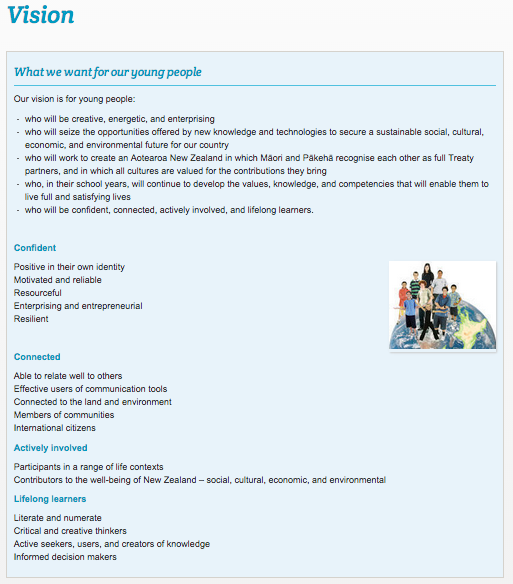
The argument can be made that not everyone has access to digital tools and information hence the term ‘digital citizenship’ should remain. However, the use of the phrases: ‘connected [...] learners’, ‘effective users of communication tools’, ‘international citizens’ in the vision of the New Zealand Curriculum (8) makes it very clear in my opinion that we are tasked with preparing all our young people to actively participate in our increasingly digital world. Do we really need digital as the descriptor? Why not just call it citizenship?
Let’s look back at the Netsafe description. By removing the references to ‘ICT’ or ‘digital’ you end up with the description of a citizen we’d probably all agree with:
- is confident and capable
- participates in educational, cultural, and economic activities
- uses and develops critical thinking skills
- is literate in language, symbols, and texts
- is aware of challenges and can manage them effectively
- relates to others in positive, meaningful ways
- demonstrates honesty and integrity and ethical behaviour
- respects the concepts of privacy and freedom of speech
- contributes and actively promotes the values of citizenship
Our students and we are no longer just citizens of a country, New Zealand, we are also citizens of a digital, global world. To separate citizenship and digital citizenship is no longer relevant in a world that is permeated by digital use; teaching them as two separate topics makes them harder to grasp and less embedded. Keeping ‘digital citizenship’ and ‘citizenship’ separate is continuing to live in the world of the ‘digital immigrants’, not preparing our young people for the future where digital tools are as accepted and taken for granted as today’s electric lights and flushing toilets.
To be responsible citizens in our increasingly digital world, we need to fulfill our rights and responsibilities in all settings we frequent, both physical and digital spaces.
Acknowledgement: I would like to thank my critical friends +Andrew Cowie, +Annemarie Hyde and +Sonya Van Schaijik for their incredibly helpful feedback and comments to my ideas! Special thanks to +Sonya Van Schaijik von inviting me to be part of #edbooknz!
Footnotes:
(1) Mark Prensky. Digital Natives, Digital Immigrants 2001 http://www.marcprensky.com/writing/Prensky%20-%20Digital%20Natives,%20Digital%20Immigrants%20-%20Part1.pdf
(3) "Citizenship is the status of a person recognized under the custom of law of a state that bestows on that person (called a citizen) the rights and duties of citizenship". http://en.wikipedia.org/wiki/Citizenship
Subscribe to:
Posts (Atom)