Showing posts with label GAFE. Show all posts

Wednesday, 18 July 2018

A cross-curricular curriculum

The school holidays have been busy as I was invited to present at two events on consecutive Saturdays: The Google Sparkshop organised by the lovely Beth Lamb in Whangarei, and the Microsoft Innovative Educator Expert Hui (#NZMIEEhui18) in Auckland. The new Digital Technology Hangarau Matihiko Curriculum was at hot topic at both events. I wish I knew more about the Hangarau Matihiko version, but sadly my reo Māori is not good enough to understand the document , so I am hoping that my colleague Kerry will be able to explain it to me when I get back to work.

There seem to be mixed emotions around implementation of the DT HM curriculum; some teachers are ready to embrace it, to use it as a validation and extension of what they have already been doing, others are reluctant, unsure where to start, maybe even overwhelmed, and apparently other teachers are not going there yet at all. With an implementation deadline of January 2020, now is the time to get your head around it, because 2020 will come around very soon...

At the #NZMIEEhui18 in Auckland, Iain Cook-Bonney and Chris Dillon gave a keynote on the new DT HM Curriculum. Chris used the expression "cross-curricular curriculum" which has been milling around my head since last Saturday now. What is a cross-curricular curriculum, how do you apply it - and why would we have that in the first place?

What is a cross-curricular curriculum?

Image Source

Generally I understand Curriculum as the document outlining what student need to learn at different stages in their schooling. It is usually split up into subjects / learning areas. To use a curriculum in a cross-curricular way, I see the learners going through the various learning steps, reaching the Achievement Outcomes or Progress Outcomes while being engaged in one or more other learning areas or subjects. Our Raranga Matihiko Programme is such a cross-curricular way of working towards Progress Outcomes in DT HM while being engaged in a Social Sciences, Art or other context. I can see more cross-curricular approaches in primary and intermediate schools than in secondary schools, and I assume it must be much easier to develop an understanding across the curriculum at the lower levels than at the higher ones.

When I want to teach in a cross-curricular approach, ideally I work in collaboration with a colleague. I might not understand the ins and outs of the specialist knowledge in learning areas outside my own; however, I need to have a base understanding what these areas are about, how they approach learning, and I need to know who I can ask when I - or my students - need to know more. I realise I am in quite an unusual position, I started out as secondary teacher and subsequently taught in intermediate and primary age environments, so over time I had to develop a greater understanding myself far beyond what I expected back when I was a high school music teacher. 

In fact it was a comment by Gerard MacManus in my Raranga Matihiko session last Saturday that highlighted this to me: I asked the participants to familiarise themselves with the Progress Outcomes of DT HM by 'cutting out the fluff' and 'focusing what the essential points are'. There were some comments about how there is jargon, how it isn't easy to understand to many teachers, and Gerard rightly said something along the lines of "but isn't this the case in all subjects". I'm not sure that I told you anything you didn't know yet in my sessions, but I can't tell you how thankful I am that you came to my session and that you made this comment! Gerard is absolutely right, every subject / learning area has jargon, 'fluff', in the NZC, and unless you are familiar with the matter, it can seem quite hard to understand. That is the reason why there are a number of documents to put teacherese into kids' speak (see for example this site for Literacy Progression in kids' speak). One of the Whangarei teachers at the Sparkshop talked about developing a kids's speak version of the DT HM curriculum which would be helpful not just for students.

Why a cross-curricular curriculum?

Ivory Tower Library of Primitives 2C
Image Source
I completely agree with Chris that DT should be seen not as a stand-alone subjects that gets addressed twice a week for 45min at a time in the computer lab (this was one of my concerns which I voiced during the consultation process). None of our Learning Areas should really be stand-alone any more, the good old ivory towers of years gone by need to be pulled down and opened up. You may ask why? Life is not organised in different subjects, life is messy (I once saw a really cool image with tidy paint pots, representing school curriculum, and the a really messy mix of paints, representing life but can't find that anymore; if anyone knows where it is, please send me the link!). Future-focused learning is all about giving students the necessary skills, tools and knowledge to be successful in their future, and as far as I can see that will involve applying across contexts and in areas we don't even know about yet.
In the NZC (implemented 2008/2009), rather than as a separate learning area, e-learning features under Effective Pedagogy (on p.36 of the curriculum document). Even though it has now been included into the learning area Technology, the value of e-learning across the curriculum remains.
Chris made another very interesting point when he explained his expression "cross-curricular curriculum": There are simply not enough DT teachers around the county, so DT needs to be taught across other subjects.

How do I go about this?

First things first: No matter what subject you normally teach, have a look at the Digital Technology curriculum document.  I have literally gone through the Progress Outcomes with a highlighter to 'cut through the fluff' and get a better understanding of what steps students need to progress through during their schooling (I have blogged about this here). Please note the placement of the POs is likely to change over time.

Get yourself ready: The MoE is providing a range of PLD options for schools, kura a kahui ako, check out this page for more information. If you want to straight go to some intiaities you can get involved in for free, try Kia Takatū ā-Matihiko and Mindlab's Digital Passport - I think the Digital Passport has a deadline for enrolments, so better get started soon.


I realise I might be somewhat biased, but this curriculum is not just here to stay, it is vital for our students - and that's who it is all about after all :)
Image Source

Wednesday, 23 August 2017

The end of digital collaboration - or is it? ACEL e-Teaching 25

Image Source
Earlier this year I was approached to write an article for ACEL's e-Publications. I have focused it on the shift from a highly collaborative working environment to an environment where access to collaborative digital tools is more limited. The question I asked myself was, how do you deal with loosing the access to tools like collaborative Google docs, do you have to go 'old school' and move back into a little box?

I don't think so, and if you are interested in reading my suggestions about keeping up your digital collaboration and even inspiring others to follow suit, you can find the article here.

Sunday, 27 November 2016

Why choose Chromebooks for students in Aotearoa / New Zealand?

Just recently I was asked this question again, and it was interesting for me to reflect on it from a teacher's point of view, in addition to my ideas as facilitator. This is the time of the year where many schools are thinking about their devices requirements for the next year. Here are my thoughts:

Firstly it is important to know what your vision is: What is the school vision, and how does this translate to the vision inside your learning environment? Much could be said about how to develop such a vision, but for this exercise, let's just assume, I want to 'raise self-directed, connected, life-long learners'.

The next step is to look at your pedagogy: How will you go about working towards this vision? Again, a topic that requires lots of thought and can lead to much debate. In this instance I have decided I want to give students agency and choice over their learning, I will use the UDL principles when planning our learning plan our learning and students will have choices within a must do / can do programme.

Out of this and my school's focus I will be able to develop the actual curriculum and activities.

Nowhere in the above does I talk about using technology; however, in a future focused learning environment effective use of devices is a must to work towards a vision like the one stated. With the multitude of devices available, where do Chromebooks fit in?

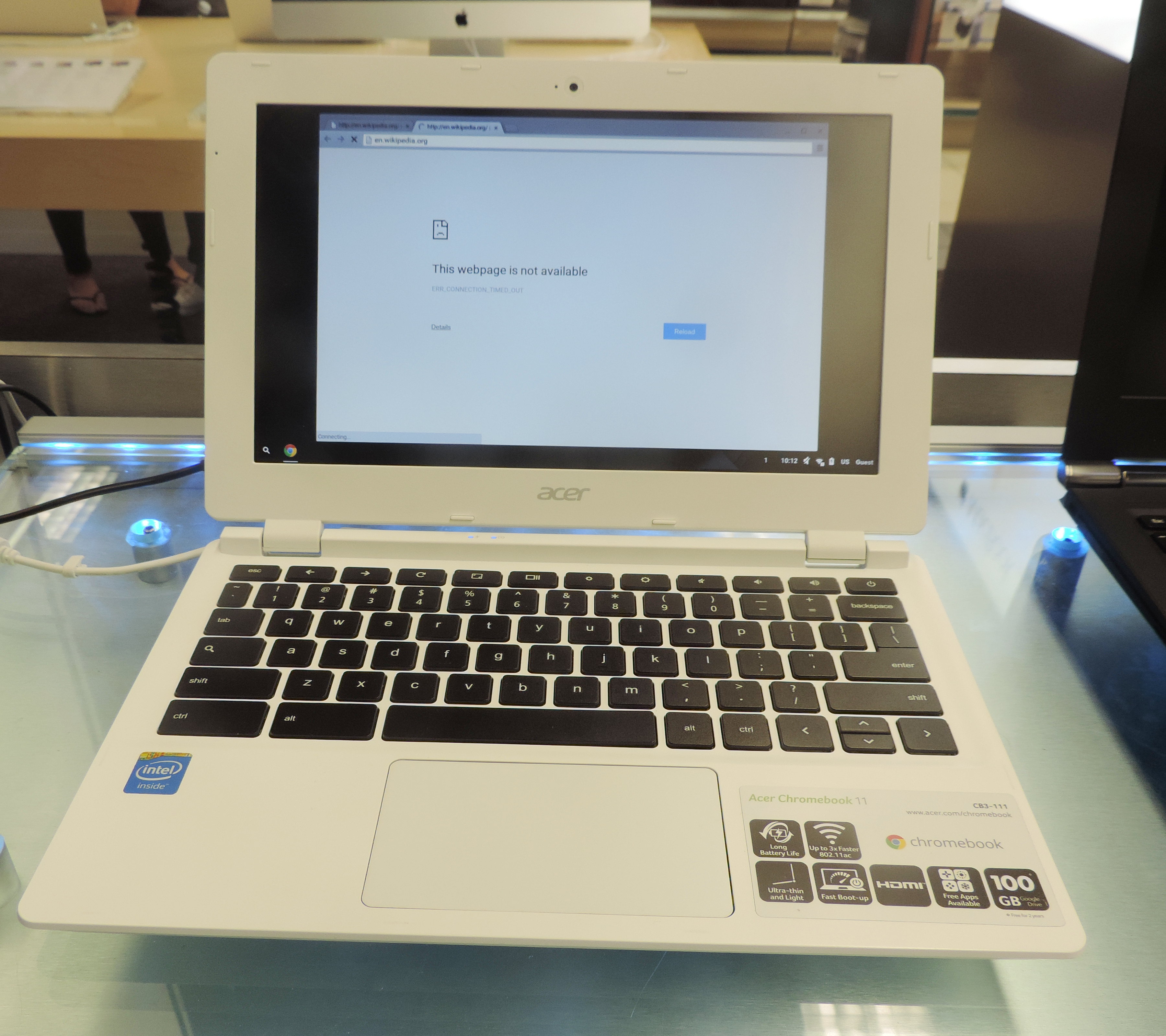
Chromebooks are laptop type devices set up to work within the GAFE environment (though saying that, two of my own sons use Chromebooks at their O365 high school). These devices are relatively cheap, they are quite hardy, especially with their SSD (rather than a spinning hard drive), and easy to manage by your GAFE administrator. Chromebooks can access any site on the www (unless you restrict access), they are many useful Chrome apps and extensions to allow you to get more creative - all provided you have reliable and reasonably fast internet access.

Schools use various approaches when it comes to devices: My current school has purchased all devices and students from y3 (and some y2s) are assigned their Chromebook to use at school. Other schools have parents supply a device to bring to class, and other schools again follow the Manaiakalani idea and establish a community trust to support parents purchasing a particular device. All these approaches have their own merits and can work when the local community are on board. There are also lease options which I have not looked into myself; in my opinion Chromebooks need replacing less frequently than the desktops / laptops / netbooks of the past, so I personally see little point in paying for lease - but I am happy to learn otherwise if you would like to share your experiences.

There are a range of small and large suppliers of digital devices: Large, nationwide suppliers might be able to offer a good price, but purchasing locally ensures that money stays within the community. Large suppliers now tend to have a special education team to help you choose the most suitable device and support setting up etc. Local suppliers might be able to help you at short notice as they are close by etc. Check with your usual suppliers, or contact companies advertising in publications such as the Interface Magazine.

There are few (or rather no) devices out there that can do everything you want to do at a reasonable cost. I feel strongly that a mixture of devices is beneficial but this requires additional managing by someone with technical know how. In our y2/3 ILE we have 28 chromebooks, all of them assigned to individual students (y3 students, and y2 students working at the beginning of CL2). We also have 13 iPads with various educational apps, as well as six Win8.1 touch screen laptops. In the back of the cupboard we have a set of old Android tablets which we have talked about but not used recently (they would still work well for recording students read etc.). The Win8.1 devices are favoured by our y2 students, but due to age of the device (and age of the users?) I have a lot of trouble with the touchscreen flickering which often though not always comes right after giving the screen a thorough clean.

Whatever devices you choose, it is important to think about device management. Who sets up the GAFE accounts and the Chromebooks, and how? Who manages device settings within the GAFE Admin Console? Who sets up individual student blogs, and how do teachers best manage online work? If you are using a mixture of devices, this task gets more complex. What usage agreements are in place, do your students understand them? Who pays when something gets broken? Saying that, since we have assigned our devices to individual students, we had basically no breakage though our children are only 6-8y old.

For managing digital student work, I thoroughly recommend using Hapara Teacher Dashboard for anything GAFE related, it makes a teacher's life much easier, and children appreciate the feedback / feed forward comments on the Google Docs etc. A lot of online programmes (such as XtraMath, Reading Eggs, Typing Club etc.) offer online dashboards for teachers, but how do students view their progress? In our ILE we use solutions from simple post-it notes on A3 card to printed out avatars which the students move along the printed out Reading Eggs maps - digital is not always better.

With devices comes sound: Think carefully what headphones you need for your devices. Despite my best intentions our headphones are still not assigned to individual students, and my guess is that this is partly to blame for the breakage of headphones we experience. Have you every had twirlers and chewers in your classroom? However, after a very serious talk with our 38 lovelies, we have seen marked improvements.

How does your classroom setup support using portable devices? Our ILE consists of two rectangular classrooms with a wide opening between them. We have flexible furniture arrangements, my side of the room has desks at 3 different heights with chairs and stools as well as benches / kneelers and 3 comfortable low seats. My little beach tent is waiting to get unpacked again. The other half of the ILE has mainly kneelers, ottomans and low seats as well as lilly pads. We have a covered verandah along most of one long side of the classrooms, and the children use outdoor beanbags to do their work out there. We deliberately removed the old desktops from the classroom as they would have restricted our ability to rearrange furniture when we needed to.

Device storage and charge are important points to consider: Some schools invest in purpose built cabinets, others rearrange exisiting furniture such as cupboards or filing cabinets (remember to leave enough gaps for air circulation). All storage areas should be lockable. Prior to being back in the classroom I had not regarded charging as a big issue, but now I personally make sure everything is plugged in over night so we are ready to go every morning.

Please feel free to ask any questions, I am happy to help if I can!

Sunday, 28 August 2016

Chromebooks for 6 & 7 year olds

Our school is well equipped with digital devices, all of us believe strongly that they are part of teaching our students for their future. I feel very lucky to be offered the opportunity to have 1:1 devices for all my students, funded by the school. But as I have always said, it's not about the devices, it's not about me - it's about how can these devices be utilised in the best way to transform student learning?

The introduction of these devices to my students coincided with us starting up a 40+ student, y2/3 ILE at the beginning of term 3, which added some very capable y2 students into the mix. While our students were well used to the idea of completing Must Dos and Can Dos when not in a group guided by an adult, with the emphasis on digital tools we added a number of tracking displays to our learning space so students can (and have to) show their progress on there. This does not only help us to monitor, it also helps them develop agency over their learning (and creates some healthy competition!). In relation to this, I have thought long and hard about displaying where children are at in relation to their peers; will 'low' students feel put down? My observation after 1 1/2 terms is that all students know who are the 'slower' and who are the 'faster' students, and while I am certain there is some of the "Look where he/she still is", I have found overall that our 41 students are kind and caring to each other, and they applaud each other when they have shifted.

A few things were very important for me from the outset: My students would be working in GAFE, they would have their own personalised blogs to document (some of) their learning, and there would be a big emphasis on collaboration. I had always advocated for the use of Hapara Teacher Dashboard to make sharing, monitoring etc. easier on the teacher and I am happy to report that indeed I find this an extremely helpful tool.

Many New Zealand schools now use Chromebooks, though often with older students, from year 4 upwards. At this younger age, though, what do my students need to be able to utilise this technology? I have to admit, my very first thought was the their technical skills, but I very soon realised that there are other, more important (key) competencies, that need developing first: Managing self, relating to others and participating and contributing.
  • Managing self is important not only to look after the digital device, by working on a device they are also required to manage some of their own learning (Must Dos and Can Dos), assisted by their teachers. They also need to learn to manage the temptation to go elsewhere on the www without us blocking everything.
  • Relating to others is hard enough for many 6 & 7 year olds in the 'real' world, leave alone an online space. We have used our school Minecraft server as one of the platforms to practise how to work with others in an online space. We have also found that after a short time students need little guidance to gravitate towards 'expert' students, and many of them have become very good at seeking out each other when they need help. (Just as a little side note, Friday week before last one of my girls asked me to stop talking during the start of their Minecraft session so they could get on with their learning [from each other]. Mission accomplished!]
  • Participating and contributing again is a skill some children need to work on both in the real world and in online spaces. Not every student is capable yet to do this to a high degree, so I have limited the number of occasions where they are truly collaborating in Google Drive for the time being. However, I have noted that some of my students are now creating and sharing Google Docs with each other as a natural progression from working together on one piece of paper.
How about those technical skills I mentioned? I realised very early on that not all students have a grasp on how to use a keyboard yet. Out of all the typing programmes out there, BBC Dance Mat Typing still appeals to me the most. It is quirky and fun, and it teaches the necessary skills. However, it is lacking a teacher dashboard, and I have not monitored its use by the students thoroughly, so one of these days I will get back to it and think about how I can utilise this (or another typing programme) better.
Another skill I wanted them to obtain early on was how to actually work in their Google Drive. As mentioned above we have Teacher Dashboard, so certain folders are set up for them. I took them through one lesson of how to create a new document, how to insert images etc. A number of our students have never looked back, just the other day some of our 6y olds wrote up a document all by themselves, printed it off and gave it to the relief teacher for pasting on a poster.

Example of a student using Google Docs to write a narrative inspired by the inserted image.
Some of our students target students for our ALL programme (to accelerate their writing progress), so I have introduced all students to the Read & Write for Google Chrome Extension (which I have added to each of their accounts through the GAFE Admin Console). In Google Docs we have experimented with using Voice Typing, followed by using Read & Write to listen back to what we have written.

Here are some ideas of how we are currently using our Chromebooks:
We have a class site which contains our planning, links to external sites and some of the students' tasks. Every day students have to complete a number of Must Dos, currently this consists of XtraMath (at a designated time) and Reading Eggs or Reading Eggspress and Mathletics, as well as Study Ladder (when we have enough time). All of these are linked out of our site, which I have set up (via the GAFE Admin Console) as the first tab they see when they open Chrome. We have had issues with the homepage not showing after we closed tabs, so we have also bookmarked it to their Bookmarks Bar.


In addition we have been using Google Drive for some of our writing as well as for Reading Responses. While I love Voice Typing in Google Docs, I have found that younger students can be intimidated by a big blank piece of paper, and should they get beyond the page, they easily lose track of where they are at. I have found Google Slides much more user friendly for children this age, as each slide shows on the left and they can easily navigate back and forth. We have used this for basic narratives (slide 1 title, slide 2 introduction, slide 3 problem, slide 4 ending), for a collaborative poem inspired by a poem in a Junior Journal etc. For connecting reading and writing (reading response), I have set up a file called "Independent Reading Activities" in Google Slides where my top reading groups get to complete one task every week in relation to one of the texts in their readers. I speak to them about it briefly in class, put it up on the white board and show it in the reading plan on our site, so to there are multiple places to get their instructions from. As with many tasks, I encourage collaboration, because I believe they learn best with and from each other. Another big plus for Google Slides is that they easily embed into Blogger, more easily than Google Docs.

Hapara Teacher Dashboard is a fabulous in helping me keep track of what and how they are doing. At a glance I can see who has or hasn't started their task. 
I visit each of their files to give them feedback and feed forward through comments - or as my children say "Mrs. Kern, you messaged me, and I messaged you back".


And teachers make typos, too...
Teacher Dashboard also allows me to see at a glance what site students are currently working on. Over the last ten days I have used the Highlights part of the Teacher Dashboard on two occasions to close a tab to a site I didn't want the students to visit. As the children are using just their device, it is also very easy to check out the browser history to see what sites a particular student has visited (this simple way is still the fastest for me at the moment).

Getting their 'own' Chromebook has become something students aspire to. At this point in time we have assigned a device to each of 'my' year 3 students as well as those year 2 students working at the beginning of CL2 in writing. With their name on the lid of the device, students have been very careful with 'their' device, and we have had no breakage whatsoever in 1 1/2 terms. 

What isn't working so well...
  • Posting to our blogs - we don't do it often enough! I am not sure if if they are a bit young, if it is my first time working with this year level, or a combination of both - or something else entirely! My intention was to have something published to their blog at least every fortnight, but another week has just passed where we did not manage to do so. While our school expectation is that we show good quality work on our individual blogs, we also advise our audience that we are still learning:
I think my biggest problem is that I still see it as an 'extra' and don't integrate it well enough into the programme itself, and as an 'extra' it doesn't happen often enough.
  • Headphones!  Headphones don't get treated with the same respect as their 'own' Chromebooks, so we have purchased more, have put up shoe organisers to house them, and I had all intentions of naming each set of headphones to encourage a similar care as the students have shown with their devices. However, the naming part is yet to happen... We had some issue when ordering our headphones, returned one lot, finally received another, when I realised that they had two individual plugs (microphone and headphone) rather than one integrated plug. I kept these in the end (as I really needed them), and we can make them work just fine, but ideally, in the future, I will make sure to get sets with integrated plugs.

Does it make a difference?
The devices themselves make no difference, it's how we use them that hopefully transforms learning. I am convinced that my students have further develop their ability to manage self, relate to others [in the online world] and to participate and contribute  - and some of this is rubbing off into the 'real world' (as some students have earned a lot of respect from others online, their offline relationships have changed, too). Most of them are now well able to navigate through our site, to access their Google Drive and work on files within their folders. Many students are able to create new documents and share them.
Aspects of their writing are benefitting, too. Spelling is overall improved when using a device (yes, we have spell-check enabled, but I believe that this helps you with spelling, you need to be able to choose from a selection of suggested words - or realise that none of them are what you are looking for as your spelling attempt was too far out). They have become faster at typing. Most importantly, though, when they are using their devices, they are showing more pride in their writing as from the outset letter formation and 'rubbing out' is no issue, neither is rearranging their writing to make more sense, or adding detail.

In 2017, the year 3s will move into our previously established Y4&5 ILE where they will continue to work on 1:1 devices, they will publish to their blogs more regularly etc. I am hopeful that our work this year has set them up in a way that they will find it easy to fit into the environment and cope with the work at the next year level up. With another 1 1/2 terms to go, this is merely a snapshot of where we are at currently, and I plan to update on our progress later on this year.

Saturday, 25 June 2016

PLD Term 2 2016 - Reflections

My reflections on three 'away' PLD events this term

GEGNZ Sparkshop in Auckland 28 May 2016


(go to the Twitter Stream here)


It's been great to catch up with other GEG NZ educators. Approx. 50 participants shared, learned and collaborated on a variety of topics around the use of Google Apps in education. I really enjoyed the session with +Ellie Mackwood around using DTs with learners with SEN - a lot of this applicable to our young learners in our y2&3 ILE, too. Another fabulous session was run by +Lenva Shearing, she shared a multitude of useful Chrome Apps and Extensions. I especially appreciated the extra time she took over lunch to show us some of the ins and outs of Hapara Teacher Dashboard.

Apart from the app tricks and tips that come in useful as my students are working more within GAFE, I have been reflecting on the way PLD event experiences differ from when I attended them as a facilitator to attending them as a teacher. As a facilitator I looked for a wide range of applicable learning that I could pass on to the educators I have been working with. Often I would bookmark tools, presentations etc. for later and sit down and tutu until I was confident I could pass this on to an interested teacher. As a classroom teacher now I am looking more for ideas that are directly relevant for my context and the learners I am working with. With no time set aside in my day to 'play', I probably pick up on fewer tools than in the past (not saying this is better or worse, just noting that this is different).

I also reflected on the attendees and the content of the presentations. This was free PD and even with my rather patchy Social Media presence nowadays I saw it advertised weeks ago (and two colleagues joined me). Among the 50odd participants there were few of the GEG educators I used to meet in the past (having been overseas for a year probably added to that). Another participant mentioned she was surprised that not more Auckland teachers took up this offer of free PD. I suppose Saturday morning sports are an important commitment for many teachers and parents, reports coming up etc. all have an impact.


Educamp Tai Tokerau in Whangarei 11 June 2016

I had been to two EducampTT previously (from memory), and this one probably had fewer attendees than the ones in the past. I believe the annual event did not run in 2015, so I expect this had an impact - as well as the game All Blacks vs. Wales in Auckland the same day. And again it was a Saturday where many of the rural primary teachers have commitments. [One of my wonderings: Am I right that there are more primary than secondary teachers represented at such events, and why is that?]

In difference to the Auckland event, there were lots of familiar 'experts' present. Due to the number of attendees rather than individual workshops, a smaller number of topics were presented to everyone in the room.

I personally gained less from this than from the previous experiences, but it gave me an opportunity to revisit some of the tools I have come across previously. Especially Edpuzzle is something I want to explore more; I would like to investigate flipping my classroom, and Educreations could be one way to record 'lessons', or I could use Edpuzzle for a range of existing (or my own) videos with or without added questions for my students.


As I had not quite had enough of commuting that week lol, I also attended the Open Night at the MindLab Whangarei 13 June 2016.

First thing I realised was how long it takes to travel from Mangonui to Whangarei - at least 1h 45min. I am lucky to live in Kerikeri, 45min south of Mangonui. As I have previously written about, I am very passionate about professional learning for rural and isolated teachers, and commuting to Whangarei for a 4h sessions every week for (I think) 16 weeks would be hard work. In 2015 I had encourage the MindLab to come to Whangarei for Northland teachers to be able to take advantage of the great programme they are offering, but back in the classroom working long hours, I would struggle with the commute alone.

Karen Baker competently presented the 'intro' to the course. I was interested to see that the ITL research was quoted, something I had not come across much in New Zealand before but have worked with intensively in Australia. It sounded like I would enjoy a lot of the content, but given that I have worked across this field previously I am not sure that I would find enough 'new' learning to justify taking that much time away from my day job and my family (please note the order... sigh...)

I am incredibly thankful to my colleagues for their company on the trip to Auckland and to our principal for the financial support.


Saturday, 21 May 2016

Setting up and moving into a year 2 & 3 ILE

During last term the decision was made to move our y2 and y3 classes into an Innovative Learning Environment. After countless hours in the holidays setting up and planning, and 3 weeks learning together I can truly say I am enjoying my days!

We currently have 41 learners; we are using two connected classrooms with a large opening between them, and we have a large covered verandah out front with beanbags our children use as quiet space. We gathered a variety of furniture from our previous classrooms and elsewhere around the school, and we are eagerly awaiting the imminent arrival of some additional items we have ordered. While we don't have separate breakout spaces, students have been making use of the spaces we have created within the classroom, e.g. my little green tent is well frequented. I am still watching in regards to catering for introverted students, but so far I have not seen any issues yet.

For continuity and administration we still have two official form classes, but we are mixing for many activities. We decided to run the class(es) loosely based on the UDL principles, with a particular topic / strand / concept for all learners but then adapting this for where these students are at. As a simple example, we were working on multiplication in maths, and while everyone worked on skip counting etc. the stronger learners had to go further than the less strong ones. As my experience is more with older learners, I mainly work with students at the upper end of the spread of abilities. Being able to focus on this has been real game changer for me as I feel I can now start to extend them where previously achievement data showed that while my students at lower levels were making accelerated progress, the students at the higher levels were progressing at a considerably slower rate.

One of the concepts I am still trying to get my head around more is 'acceleration' vs. 'remediation'. I originally come from a school system where everyone was expected to reach the same level at the same time while being taught in the same way. If you did not achieve the level, you either scraped through and continued to struggle in the next year, or if your 'failings' were severe enough in at least one subject, you had to repeat the full year in all subjects. Working at an individual student's level was the solution to this problem in my eyes.
However, one of the very valid points made was that if the expectation is that every student will reach at least a certain level of competency in a particular area of learning, keeping them 'at their level' and not exposing them to enough new, higher level learning can set them up for failure. Socially it can also be an issue when a student is working with children that are several years younger than them - what does it do to your confidence when the younger ones keep on moving ahead of you while you are still treading water? So how do you 'accelerate' a child's learning without going back to the 'one size fits all approach?
In our current environment, the children are up to 16 months apart in age, socially close enough in age (though it is relatively easy to spot the 6y olds from the 7y olds, and not just by size). As part of the ALL programme we are giving extra time to our struggling writers (most, but not all boys), and as of late I have started to see a difference in the way they approach writing in class. While we do group the students by level in reading and in maths, and in writing with the ones working towards or at the beginning of CL2 in my room, we are trying to have mixed ability within that and / or offer opportunity for mixed ability work. We are setting pretty high expectations, and I believe this has an impact on to what level the students aspire.
I am still working on my understanding of how to accelerate students, and I'm starting to think that the acceleration and working at their level are not the polar opposites I believed them to be when I first heard about it.

We are really trying for the students to develop agency, to know where they are at and where they are going next. We have many different displays where they are tracking their learning, where their goals are displayed, and with not much art work on the walls yet, most space is now taken up. On my recent visit to Stonefields School I had a glance at their app in development which will show this online; it was really intriguing, but I am not sure yet that would meet our needs best at this point in time. There is something quite satisfying about moving your avatar up on the Reading Eggs Skills Bank display, or moving your named rocket to the next level sight words? (We go through lots of blue tack, velcro and staples!). One of our rooms has a lot of visuals e.g. for 'interesting words', and I am struggling to find space to put more up. I have been wondering if I should move this online, especially as 'my' learners are using their own Chromebooks. Maybe I could connect an older unused laptop to my TV or the Chromecast and just have the relevant tab on our class site open during Writing, freeing up my laptop for when I need it? What works for others working with a similar age group?

In our jam-packed days, things do fall by the wayside, and for example posts to the children's individual blogs have not been happening as much as I would have wished. The students working towards or at the beginning on CL 2 in writing have been assigned their own Chromebook, and we had one session so far for students working in Google Docs. After the initial decision to go 1:1 last term, we I had held out assigning them as I very quickly realised that students needed much more than just the technical ability to operate a Chromebook, they needed to be able to manage themselves and get on with their learning. Btw, being in the shared space has really had a positive effect on those students that are still learning how to themselves, they had to learn that their actions affect a larger number of others and that some students younger than them were 'showing them off' :) I hope to incorporate the GAFE tools better in our days in the coming days and weeks. I had also intended to contact parents regularly, and in the busyness of my days I have really neglected this - something I definitely want to get back into.

On Friday we finally started my little passion, it was the first time we visited our new Minecraft Lab which my oldest son set up for us. All our learners present on Friday had a turn, and it has been very interesting observing them in their interactions. It also reminded me not to underestimate their skills as they were happily spawning all sorts of creatures - something we will curb with a bit of server tweaking :)

Inquiring into your practise has to be a way of life in order to be an effective teacher, so planning something like a whole term ahead in great detail is simply unthinkable to me. There are few days when our DP +Angela Nunn who I share the space with and I have not discussed how to tweak things to better meet our learners' needs. It can be very tiring, but there is nothing better than them succeeding or seeing the little light bulbs appear above their little heads - like when a 6y old just this week explained to me what 40 +36 was: "76!" he told me. "How do you know?" I asked. "Well, you have 30 and 30, that's 60, and then there's 10 and 6 more, that's 76!" Do I need to say more?

(Pictures will follow)

Wednesday, 9 September 2015

Google Updates


There have been a flurry of updates around Google lately - from the announcement of a holding company Alphabet https://abc.xyz/ to new logos and beyond:

I am very excited about the new addition to Google Docs, a tool called Voice Typing. You find it under Tools - Voice typing


This will pop up a little box with a microphone icon in it, to activate the dictation function, you will have to click on the icon:


There are a number of punctuation commands: "Period", comma", "exclamation point", "question mark", "new line" and "new paragraph" according to Google Docs editor help. I have also found that it started responding to "full stop" after several attempts.
You might see a grey line appear under some of your dictated text. Right-click on this and you will get some suggestions:

The 'so what': Why do I care, and why should you?

I have blogged before about the value of digital storytelling, by looking at incorporating different ways of telling our stories rather than just in text. I believe that this nifty little tool will allow students to tell their stories orally and turn it into text for them without having to go through the often painfully slow typing process.  I could see this especially helpful for students with special learning needs, if offered as one of multiple means of expression and action. Students still have to edit their text to ensure that it represents what they want to say, so they have to engage with the text further.
Combine this with a Chrome Extension like Read & Write for Google, even just on the free version, for students to have the option to hear this text spoken back to them and I think we are really onto a winner here. Not only are we allowing students to get their text to paper without having to physically type it, we are also lightening the cognitive load on them a little, allowing them to spend more time on getting their story just right. Taking away barriers allows us to focus on what is really important - the learning.

Tuesday, 7 July 2015

Controlling the on-sharing of your Google Docs

It was signalled at the GAFE Summit in Sydney in April, but today is the first time that I have seen how you can control the on-sharing of your Google docs.

Click on Share at the top right of your screen, and this window opens:


Select Advanced, and you get this new window:


Just above the blue 'Done' you can Change who has permission to add people:


Why does this matter? Some information in the education context is private to a certain degree and should not be shared on beyond the initial group. This change will make it much easier for schools to fulfil their obligations without someone accidentally sharing confidential information in the wrong circle.

Tuesday, 28 April 2015

Cloud Computing: Moving accounts

Over the last few days I have come across a few comments and posts in regards to moving accounts so I thought I share some of my ideas and observations here. Please add to this if you like!

Image Source

What is cloud-computing?

Cloud-computing is`when we talk about saving files 'in the cloud' rather than on our own computers or on say the school server. This is a somewhat misleading term, by no means do we have computers float around in the sky :) Instead, companies are using massive big servers at different places across the world, and rather than saving your file to your computer, you save them via the internet to their servers.

Image Source
Advantages
Your files are accessible on multiple devices and, if you share access, by multiple users, which makes collaboration, synchronous and asynchronous, from the same and different locations, possible. The cloud service provider looks after your data without you needing to think about backup or losing all files in case of a hardware failure (dropped laptop etc.). When you change devices, your files come with you. In addition, services like Google and Office365 offer not just the storage capacity, also built in applications (such as Google Docs or Word Online etc.) within 'the cloud' minimising the need for installing costly (and memory consuming) applications. Many such services are free of cost (at least to a certain degree).

Disadvantages
Image Source
Your files are no longer in your possession at all times, depending on the service you used they may be hosted within or outside your country of residence and subject to the laws in those countries. While all providers assure us our data is safe with them, some users are concerned about hacking, about their privacy and about data mining (e.g. if you browse the internet for particular items, ads for these particular items are more likely to appear in your search results even if you search for something completely different). Your files are attached to an account, you need your username and your password to access them (rather than just going to My Documents on your computer). When your account is closed, the data is lost.

Schools and Cloud-Computing
Many schools are either considering or have already gone 'into the cloud'. I am an advocate for cloud computing when used to support effective pedagogy and 21C / future focussed learning.  I believe that it can be a vital tool to support our young people to become 
Vision NZC

General Capabilities AC
Sometimes a lack of understanding about the nature of cloud-computing becomes apparent when a teacher or a student moves schools and changes email accounts, or when a content from an external cloud gets moved to a new internal account. The nature of the data and files in the cloud is that they are attached to an account, and if that account is no longer existent, the access to that data is gone.

Important considerations for GAFE schools
(Note: I will research what possible solutions could work for O365 accounts and share this at a later date).
Who owns a teacher's files? Are any files shared with others? Do these need to be accessible beyond the teachers' tenure at a particular schools? Is it important to keep a continuity to show development of ideas, resources etc. over time?

Some possible solutions include:
    Image Source
  • Don't close accounts after teachers / students have left, archive them instead which keeps all files live.
  • Have all important files owned by an account independent of a personal account, e.g. juniorsyndicateadmin@xyzschool.co.nz / juniorsyndicateadmin@xyzschool.edu.au
  • Use Google Takeout to create a zip file of all data - this keeps you with an offline copy which could be loaded into a new GDrive and shared again.
  • Create a new Google account / using your new GAFE school account, share every file in the old account with the new account and hand over ownership to the new account. (For students under age 13 leaving a school and not enrolling at another GAFE school, parents need to create a Google account to hand files to - they might need some support from the school for that.)
  • For blogs, add the new account to the blog as admin, then you can remove the old account
  • Your GAFE Administrator can also hand over files to a new owner before deleting an account.

Alternatives
Tim Harper made an interesting comment on the VLN , suggesting schools could think about one joint platform across all of New Zealand to make transition from one to another school easier. What are your thoughts on this? Do you think this would work for New Zealand? For educators from other countries, how is thins handled in your education systems?

Image Source

I believe cloud-computing is an important tool in modern education, when used well it can enhance learning considerably. It is important that we think carefully about what we do with accounts and the data attached to these accounts to ensure that the benefits are not outweighed by the potential loss of all files to everyone who had access to them.

Monday, 2 March 2015

Does it have to be an either or? Some ponderings about platforms

It's been an interesting few months in the BeLchick's world - not only having in regards to having moved the family 'across the ditch' to Australia, also in regards to work itself. Quite a bit is the same, and quite a bit is different in this new role - or is it?

Image source
In New Zealand most of our paper work and administration was hosted in Google, our team meetings went through Google Hangouts etc. I know Google apps quite well, have completed various exams and qualifications and I have worked a lot with schools to meaningfully use Google apps in their teaching in learning. Here at Expanding Learning Horizons our parent company is a Microsoft partner, we conduct training on behalf of Microsoft at times. We use Lync for our online team meetings, share OneNote notebooks etc.

Image Source
In New Zealand many of my schools used iPads and had or were investigating Chromebooks; here, the majority of the schools I have come in contact with so far have Windows 8 devices.

In New Zealand I worked in a MoE funded role as Learning with Digital Technologies Facilitator solely with state schools and state integrated schools. In Australia most our work is funded directly by the schools, and the majority of our schools are not state schools.

Image Source

These seem to be glaring differences, and I have been asked questions about it, many of them along the lines of 'how do you cope with all the changes', and 'how could these schools choose platform X/Y/Z'?

Firstly, I cope just fine thanks for asking - being a tutu (derived from te rēo Māori, meaning someone who likes to play around and try out / figure out new things) I enjoy working out new things. And by being thrown into the deep end, with the support of my lovely team leader I have learnt lots in a short while.

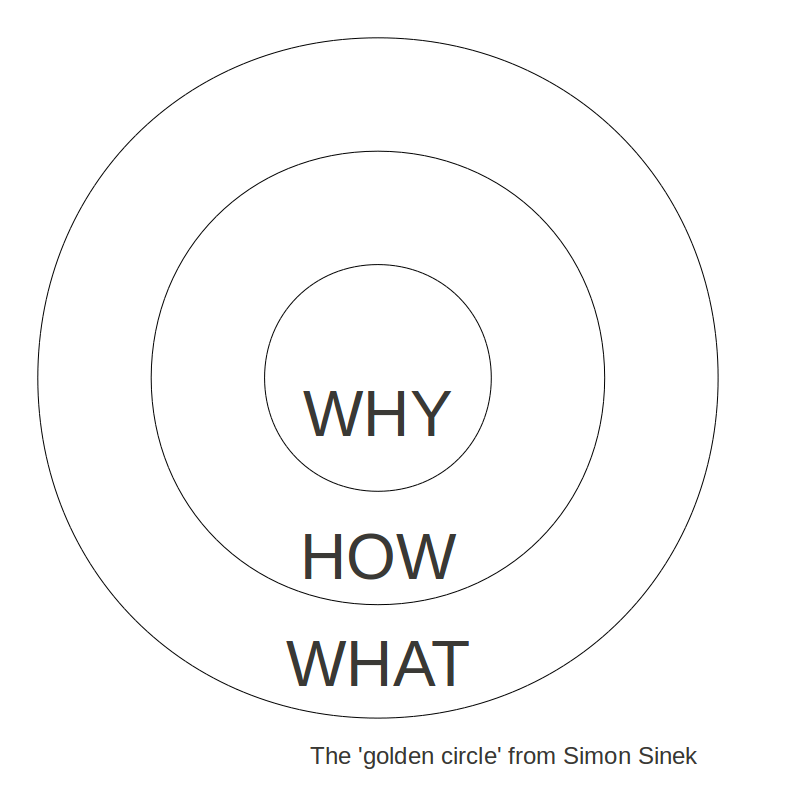
The second question is very interesting, and I have been thinking about this for quite a while now: Why and how do schools make the decisions they make? There can be quite an outrage by some innovative educators that have adopted the one or the other platform as theirs when someone else chooses a different platform. I can't help but once again come back to the Golden Circle (see Simon Sinek e.g. here):

Image Source


WHY - What is the vision for the learning at our school?
HOW - How will we put this vision into action?
WHAT - What actions are we taking?


Office365 or GAFE or iPads or BYOD are NOT A WHY or VISION, they are not even a HOW really but simply a tool to support the HOW.

Regardless, within the progression of changing teaching and learning at a school, permitting 'open slaughter' in regards to platforms and type of devices used can create havoc and be detrimental to the quality of learning we are trying to improve. So if you are looking at making changes in your school / classroom, you might want to ponder the following questions:

  1. What is your (e-)learning vision?
  2. How will you put this into action?
  3. What tools are you most familiar with / confident about? Are they supporting your vision?
  4. Have you got support within your setting with expertise beyond your own, and what is their expertise?
See, I believe we should always start with something we are familiar with, and make small changes from there, one step at a time. Sometimes the decision is made for us, and we have to make the best of a situation. For some schools this might be prescribing one platform for all to use, or one device for all students because this might be the one change they are ready to make at that time. If they have gone through WHY and HOW, and this was the decision they have come to from there, let's support them that they are ready for their next step, and then the next step, and the step after that.

I include the teachers with the learners and with being considerate of their needs. Yes, they are professionals, and as that we expect that they continually up-skill, but that, too, has to be one step at a time. I also emphasised their above because I truly believe that there is no one solution that is right for all schools, they need to make their decisions based on their vision and their needs. 


So after all this, do I personally think one platform is better than the other?
I move between many different platforms to suit my needs at particular times. I have access to a MacBook Air, a Samsung and an Acer Chromebook, a Toshiba Ultrabook, a Surface Pro3, an iPad Mini, a Nexus 3 tablet, and you would see me pull out one or the other at different times. I have not found one device that suits all my needs at all times, and I'm not even looking for that any more. I have access to Google Drive, to OneDrive, Office365, Dropbox etc. and I swap between them as I need to. I love aspects of the different platforms, and no platform does meet all my needs at all times
.
Can you see the common theme? It is about meeting different needs, at different times. 

Image Source
Some of the the tools that I currently find especially valuable include:
  • Google Drive for the ease of collaborating synchronously and asynchronously on documents etc.
  • OneNote2013, esp. on Windows 8 devices, for collaboration and fabulous integrated UDL features
  • Google+ incl. Communities and Hangouts for connecting beyond my organisation
  • Office Mix add-on which allows the creation of flipped learning opportunities and monitoring of learners accessing this content


My blog post is not influenced by who pays my wages; I'm of the opinion that if you have nothing nice to say, say nothing at all, so if I didn't like the one or the other platform, I wouldn't have written this post. I believe that I get the best of all worlds if I learn to navigate between them, but I do not expect everyone I come in contact with to be doing this, or to be aiming for this. My role is not to tell you what to do, it is to support you to make the right decision for your situation and then support you to take the little steps you need to take. For me personally I don't think I need to settle on one platform or the other, and I can make use of what supports my needs best at different times. How about you?


Monday, 2 February 2015

Speech Recognition Add-on for Google Docs

I'm always on the hunt for tools that make taking part in education easier for all learners with their varying needs - here you can find a number of my blog posts to do with UDL. Over the weekend I saw mention of the Speech Recognition Add-on for Google Docs by +Allanah King which sounds very promising.


How to install Speech Recognition:
Make sure you are signed in to your Google account. Go to any existing or a new Google Doc, select Add-Ons, select Get add-ons. Type Speech Recognition into the search bar, then install this free add-on.

How to use Speech Recognition:
Here is a handy little tutorial.

My experience with Speech Recognition:
I expected my pronunciation  (German accent on New Zealand English) to potentially cause some issues (as it did in Spell Up) and dictating my first sentence proved rather frustrating, it took 5+ attempts to get it right. During this, I moved through various English accents to see if one of them would pick my pronunciation up better than another. Frustrated I changed it to 'Deutsch' = German, interestingly no different accents available at this stage, and it picked up my German beautifully (German after all, passport or not!). When I then returned to English, most my sentences transcribed correctly in both New Zealand and Australian English. The add-on does not recognise words in te reo Māori we commonly use in New Zealand.

The 'so what':
My vision is to have my learners access, engage with and share their learning no matter what their needs are. Some students are not engaging with or able to type. While some devices will have their own in-built dictation mechanism, this Speech Recognition Add-on for Google Docs can allow learners young and old enter text by voice. In addition, the potential editing required after to correct text might prove very valuable.

Please share ideas and examples of how you use this or other tools to improve your students' learning!

Friday, 17 October 2014

Ulearn14 Connections

With Dr Wendy Kofoed (left) and Sonya van Schijik
Ulearn14, truly an inspirational event connecting educators from all over New Zealand and beyond! For me it started out with my running into +Sonya Van Schaijik, +Wendy Kofoed and more teachers from their school at Auckland Airport, upon which we ran into @GregReynoldsTTS who kindly offered me a ride from the airport to the Convention Centre and running into +Mary-Anne Murphy almost as soon as I stepped through the door. And that was just the start of the connections!


Day 1
I joined Prof. Yoram Hapaz' keynote late, however, he challenged a lot of us in our thinking - I have no doubt you will find a lot of good blog posts reflecting on this out in blog land. At the end of it, on the lookout for my twitter buddy and host +Annemarie Hyde it took me at least 15min to move to the morning tea area as there were so many people to connect with, hug and shriek about! It is very interesting how many connected educators I have met in different venues again and again this year, of course my colleagues like my buddy +Catriona Pene, +Angie Simmons, +Tania Coutts,+Allanah King, +Anne Kenneally and many more, my co-presenters +Annemarie Hyde, +Kassey Downard and +Caroline Bush, fabulous educators like  +Marnel van der Spuy, +Steve Katene (one of our Minecraft buddies), +Diana Wilkes, +Philippa Nicoll Antipas, +Bridget Casse, +Juliet Revell, +Myles Webb, +Mark Buckland, +Heather Greaves  - I could go on like this forever!

For Breakout 1 I chose "Educators in Pond - Getting the most out of Pond as a teacher". I see the Pond as a very positive development, provided by N4L but driven by teachers for teachers. It will be a very powerful platform if we make it that. Features include deep searches, adding resources to the Pond (own and other resources, now including an indication of ownership), collating resources in buckets, labeling of and commenting on resources, and connecting with other educators. As this is all behind the ESAA logon (which you might also use for eTap, asTTle and NCEA), you will have to go through your school (principal) to ensure your ESAA gets extended to Pond access, then you are fine to sign up here. My remaining questions are about the relationship with the VLN with its multitude of groups, discussions and resources, monitored by very capable moderators, also about the intellectual property right of resources added to the Pond, something every school and organisation will have to make a decision on unless the resources are CC.

During Breakout 2 I presented on "Supporting Universal Design for Learning with Google Apps for Education". The Museum Classroom was quickly filled to capacity, but unfortunately the connectivity was an issue, luckily resolved the next day for other breakouts. My presentation can be found here. I felt honoured to have so many dedicated educators come together, connect and collaborate around UDL and GAFE, despite connectivity issues.

The afternoon keynote by Adam Lefstein again was thought provoking, and I came to the realisation that for many of us Twitter has taken over the note taking from paper and Google Docs.

Day 1 finished with a fabulous Twitter Dinner, organised by the equally fabulous +Annemarie Hyde, hours of connecting face-to-face interspersed with a yummy dinner at the Pig & Whistle Pub.

Day 2
Dr Katie Novak started us off with a Keynote on UDL - she was FANTASTIC!!! Not only did she have lots of useful tips about UDL, she was demonstrating it in her keynote! From the way she set out her slides, to the activities she asked us to complete, to the way she walked through the 1000+ strong audience to connect with us - WOW! The conversations at the table and with other attendees afterwards were very interesting; while I don't claim I am the expert on UDL, I have researched it a fair bit (hence the presentation on day 1), and not everyone I talked with had the same level of understanding I had. At the same time, a few of the educators I talked to have implemented UDL so effectively into their teaching practise that they felt her keynote was not quite hitting the mark for them. It is extremely hard to cater for such a diverse audience, I thoroughly enjoyed the session, and one day, when I grow up, if I can't be a tui I want to be a Katie Novak!

Breakout 3 I joined +Tara Fagan's "Future Learning: Programming, robotics and missions of code". I want a ROMO!!! Lots of fun, not all of it completely new to me, but right up my alley, I'll have to connect with Tara more!!! Resources from her session can be found here. 

Look at the cool article in
the Rotorua Daily Post :)
Breakout 4 we were on, trying to spread some Minecraft Magic with "Minecraft Magic - It's all about the learning!" The star of the show was Thomas, a 13y old from +Kassey Downard's classroom. +Caroline Bush, +Annemarie Hyde and I joined them to discuss with teachers how Minecraft might enhance learning in their classroom. While we had good connectivity, the setup did not allow us to run a server, so participants were exploring individually and in groups Minecraft on the laptops we provided or on their tablet devices. As we said during the session, we are not the experts, it's the Thomas's of this world, and just about every school will have one. In fact, the underlying idea is that you do allow your students to take the lead, that you stand back and provide the guidance and support they require to support them to show you their learning. If you are interested in Minecraft, please feel free to visit Minecraft in NZ Classrooms on G+, Minecraft Teachers on the VLN and Minecraft Magic, a resource site.

After this session, we joined the GEG NZ Happy Hour, organised by Fiona Grant and other GCTs to connect with Google certified teachers and other Google interested educators. I have to admit, for a while I was extremely jealous that I was not chosen to go to Sydney for the GTA in September (you can check out my application video here). I barely wanted to look at anyone's blog post about it, that's how childish I had gotten. Thinking about what is going on in my life at the moment, I know it was not meant to be, I could not have done everything justice. It goes back to FOMO and trying to stay sane... (feel free to read my blog post about this here). Anyway, meeting up with them face-to-face was really good, they are all just as lovely as they have always been. So I can officially declare here I am thankful that I was not selected to go this year!

Quick dash home to pluck some parrots get dressed for Ulearn14 Dinner - it looked like a whole flock of parrots had been plucked by the time we were done (guess why)! It was a great opportunity to connect with yet more educators, and lots of fun was to be had as you can see:
A little collection of my Dinner Selfies;
Apologies to everyone for poor quality
due to lack of my skill as photographer!
For various reasons I was unable to stay for the Friday, but I have enjoyed reading other people's tweets, blog posts and comments about it.

There was a little bit of chatter on twitter if we should have overseas keynotes or rather showcase NZ talent. My humble opinion is that we don't get to see and hear enough overseas experts in New Zealand and I really appreciated the opportunity to be at their sessions in person. Being online for much of my professional learning, I still really appreciate the opportunity to connect with people face-to-face. I can see the point though to ensure we have our fabulous NZ talent represented in Keynotes, too.

Twitter
Image Source
Watching the #ulearn14 twitter stream on Tweetdeck was adding a whole new dimension to this and other sessions; reading the reflections, quotes, comments other tweets made about the presentation, the connections they made with other context, the replies to left to other tweets, adding to the original thought, was simply mind blowing! Where shared Google Docs give us a digital piece of paper to collaborate on, the sheer number of people trying to access them made it impossible for me to use reliable, but instead I am reading the tweeted notes of my buddies, special mention to +Kassey Downard here, which have been storified for easier access, some of which you can find here:

Twitter has also allowed for the presenters to connect with the audience in a new way; with the tweets being viewable by everyone on the big screen via strea.ma, the backstream allowed for presenters to react to audience questions, comments, confusion, straight away, something esp. Katie Novak made very good use of.
Image Source

Connecting the dots
Overall I can see that a lot of the topics I have involved myself in over the last year or so are very relevant to education in New Zealand and further afield. We are talking about personalising learning, about making learning accessible to all students, about taking down classroom walls by connecting with educators and learners beyond our classes, our schools, our communities and our country. Technology is an essential tool to this when used efficiently. At the same time, we (as the education community) are taking students' knowledge and skills gained outside the traditional classroom more seriously; teachers are no longer the only experts. A wider range of topics than previously is now entering the classrooms, even at primary level, including robotics, coding etc.
I was mulling about the keynotes I heard for a while. As I have said above, I thoroughly enjoyed Dr Katie Novak's session. I have been thinking a lot about Prof. Yoram Hapaz' session, the main ideas I took with me was that a school needs to follow one 'ideology' (I would like to say vision) to be most successful, and that the dominant ideology in NZ schools was not what the attendees thought should be the dominant ideology. I like to work in my schools from the school's vision for learning, but I am planning to think more about how schools can ensure that this vision is represented in the way learning happens across the school. Sadly I don't think I paid enough attention to Adam Lefstein's keynote though he talked about professional learning which is my field! Note to self: How can I ensure I am fully present at afternoon sessions??

Summing it up
This year, my second time attending and presenting at Ulearn has been a very different experience from last year. I have truly felt connected on many different levels. Friendships that have begun online have been deepened and extended - thanks so much everyone, especially +Annemarie Hyde! I started missing people as soon as I hopped on the plane very early Friday morning! While my adventures will take my abroad next year (more on this in another post), I truly feel I am connected to the NZ education community, and while geographical distance will have an impact, the online connections will continue.
One a more personal note I have also learnt about myself that indeed I do have things to share that others feel useful (which still surprises me often!). My efforts to connect better with attendees at my UDL / GAFE session have mainly stemmed from my experience from last year (you can read about this here). This year my evaluations have been positive, and while I wish we wouldn't have had to deal with connectivity issues, we coped well.

Image Source
I would like to thank Cognition Education for giving me the opportunity to attend Ulearn14 on their behalf, the attendees for booking into my workshops, attending these and asking some fantastic questions, and the organisers and support staff for making it all happen! I will try my best to attend Ulearn15 in Auckland!